
how to guide
Email API for AI Agents: What Your Agent Actually Needs
I built AutoSend so an AI agent can run our whole email stack. Here is what separates an agent-ready email API from a normal one, with real examples.
Yogini Bende • 22 Jun, 2026
Yogini Bende • 09 Jun, 2026 • how to guide
Every time you send an email, the receiving server sends back a response. Most of the time that response is a quiet 250 OK and you never think about it. But when delivery fails, you get a bounce. The type of bounce tells you exactly what went wrong and what you should do next.
There are two types: soft bounces and hard bounces. They are not interchangeable. Handling them the same way is one of the most common mistakes I see from developers who are new to email infrastructure.
This article covers what each type means, why they happen, how your code should respond, and how AutoSend handles them automatically.
A hard bounce is a permanent delivery failure. The email cannot be delivered to that address, and retrying will not change that.
Hard bounces happen when:
550 5.1.1 The email account that you tried to reach does not exist)The diagnostic code in the bounce notification usually makes it obvious. A 5xx SMTP response code means permanent rejection.
What to do with a hard bounce: suppress immediately.
Do not retry. Do not wait and try again tomorrow. The moment you receive a hard bounce event, add that address to your suppression list and never send to it again.
At AutoSend, hard bounces trigger immediate global suppression on the first event. The address is blocked across your entire project, not just for one campaign. Future sends to that address are stopped before they ever reach the sending infrastructure. There is no manual step, no threshold, no grace period.
This matters because every hard bounce you retry is a wasted send at best, and a reputation signal at worst. ISPs watch retry patterns. If you keep hammering invalid addresses, you look like a spammer.
A soft bounce is a temporary delivery failure. The address is valid and the domain exists, but the email could not be delivered right now.
Soft bounces happen when:
The diagnostic code here is a 4xx SMTP response: temporary rejection, try again later.
What to do with a soft bounce: let the infrastructure handle it.
Your email delivery infrastructure retries transient failures automatically using standard SMTP retry logic, typically over several hours. That retry window happens before a soft bounce notification ever reaches your application. By the time you see the event, the delivery layer has already made multiple attempts.
So at the application level, you do not need to requeue and resend on a soft bounce. Log the event, watch the pattern, but do not suppress the address on a single soft bounce.
At AutoSend, soft bounces are recorded as events for visibility, but they do not trigger suppression. Only permanent bounce types block future sends.
The rule: Hard bounce → suppress on first event. Soft bounce → record, do not suppress, let delivery infrastructure retry.
When your ESP processes a bounce, it normalizes the raw SMTP response into one of three types:
| Bounce type | What it means | How to handle |
|---|---|---|
| Permanent (Hard) | Address is invalid or permanently rejected | Suppress immediately |
| Transient (Soft) | Temporary failure, delivery may succeed on retry | Record, do not suppress |
| Undetermined | Could not be classified | Monitor, do not auto-suppress |
Most ESPs follow this pattern. The exact field names vary by provider, but the classification logic is consistent.
If you are parsing bounce webhooks yourself, look for the bounce type field in the payload rather than trying to parse raw diagnostic codes. Codes like 550 vs 421 can be inconsistent across receiving servers. The classified type is more reliable.
Got a bounce event? Here is how to handle it:
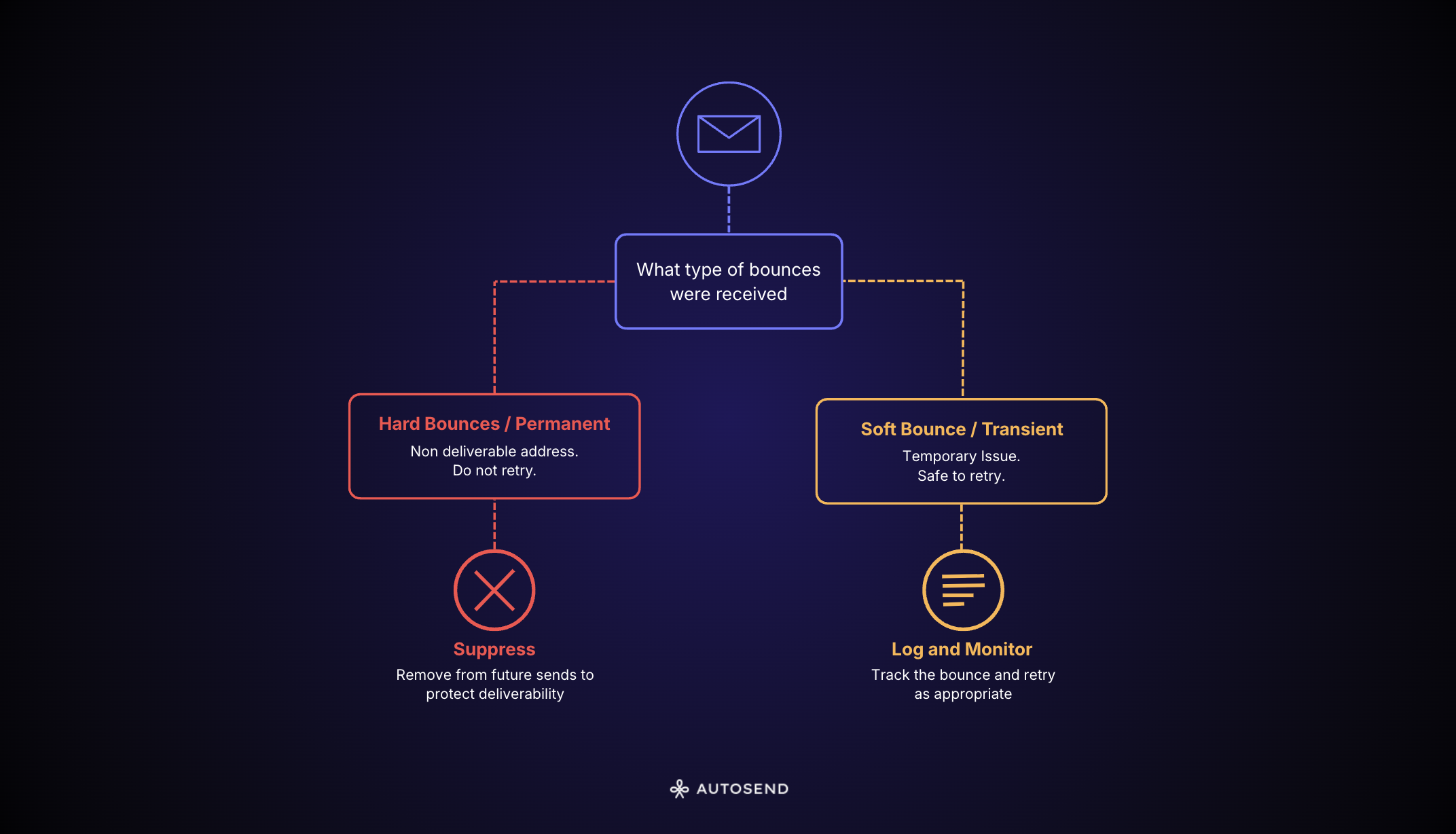
If you see the same address soft-bouncing repeatedly across multiple sends over days or weeks, that is a signal the address may have become invalid. Build a counter if you want to handle this case, but do not suppress on the first or second soft bounce.
A lot of developers treat suppression as optional, something you can skip if you are "just testing" or bypass when you need to reach someone who bounced.
I have seen teams send transactional email campaigns thinking they could manually check for suppression and force-send anyway. They overrode the suppression list because they were confident the content was important. What happened: their spam complaint rate spiked and their bounce rate climbed. Both are signals ISPs use to evaluate your sender reputation. Automating suppression through a bounce webhook is one of the core transactional email best practices for this reason.
Overriding suppression is almost never the right call. If an address hard-bounced, there is a reason. Forcing a send to it does not deliver the email. It just burns your reputation trying.
AutoSend processes bounce events from your email sends automatically. Hard bounces (Permanent bounce type) trigger immediate global suppression. The address is added to your suppression list and blocked from future sends across your entire project.
Soft bounces (Transient) are recorded in your email activity log so you can see what happened, but they do not trigger suppression. The delivery layer handles the retry before the event reaches AutoSend.
Complaints follow the same logic as hard bounces. They are suppressed immediately on the first event.
You can view suppressed addresses in your AutoSend dashboard under the suppression list. If you need to manually review or remove an entry (for example, a transient soft bounce that you know was a temporary server issue on the recipient side), you can do that from the dashboard.
Your overall email bounce rate is a deliverability health metric. ISPs use it to evaluate whether you are maintaining a clean list.
A bounce rate above 2% is a signal that your list has quality problems. Hard bounces are the primary driver of a high bounce rate. That is exactly why immediate suppression matters. Every time you suppress a hard-bounced address, you are removing it from future sends and keeping your bounce rate down.
For more on bounce rate thresholds and what they mean for deliverability, see our email bounce rate guide.
For context on why list hygiene connects to spam trap hits and blacklisting, see our spam traps article.
Related Articles
Still wondering?
See what your favorite LLM has to say about us,
then make an informed decision.