Blog

SaaS Onboarding Email Sequence: How I'd Build One (With Examples)

How I think through a SaaS onboarding email sequence: trigger on what users do, not the calendar, and meet them at the stage they are actually in.

Yogini Bende • 05 Jun, 2026 • how to guide

When Grammarly sends its first onboarding email, it does not try to explain what Grammarly is. It assumes you already know. The email has one job: get you to install the browser extension. One task, one button, no second link competing for the click. That is the whole email.

I think about that example a lot, because most onboarding sequences get the hard part wrong. They fail at the planning stage, when a founder opens their email tool, picks "7 day sequence," and schedules one email per day for a week. The calendar decides everything and the user has no say. So your day-four email about advanced settings lands while someone who signed up twenty minutes ago is still trying to figure out the basics.

Here is how I would build an onboarding email sequence instead.

The first question is never "what do I send on day three." It is "where is this user right now, and what do they not yet understand about my product." Answer that, and the sequence almost writes itself.

Start with the user's stage, not the day number

A new signup is a stage, not a date. Before I write a single email, I map the stages a user moves through. For a typical SaaS, the early ones look like this:

  • Signed up, but has not done anything yet
  • Finished setup and is poking around
  • Hit the first meaningful action
  • Came back a second time
  • Started using the features that matter

The job of onboarding is to move someone from one stage to the next, and the email is just the nudge for that step. So I do not write a fixed seven-email drip. I write emails that map to stages. Reach a stage, the matching email sends. Skip ahead, you skip the email that no longer applies. Get stuck, you get the email that helps. The sequence bends around the user.

If you want the broader version of this idea, I wrote about it in building a marketing automation workflow. Onboarding is one workflow inside that bigger picture.

Trigger on events and properties, not on a schedule

Stage-based onboarding runs on two kinds of signal:

  • Events are things the user does: signed up, completed profile, created a project, invited a teammate.
  • Properties are things that are true about them right now: plan type, number of posts, whether setup is finished, days since last login.

You read the signal and start the right automation on top of it. Two quick examples of why this beats a schedule:

  • A trial user upgrades on day three. The seven-email trial education sequence is now the wrong one, they already decided. Drop it immediately and move them into an automation that helps them get more from the paid features they just unlocked.
  • A user abandons setup halfway. A calendar sequence keeps marching and emails them about a feature they cannot reach yet. A behavior sequence notices the gap and nudges them back to the one step they skipped.

The numbers back this up. According to Brevo's 2026 email benchmarks, behavior-triggered automations get a 30.63% open rate against 20.73% for batch sends, and a 7.39% click rate against 2.27%. Triggered email wins because it reaches people in the moment they are acting. You are not guessing when they care.

A mental model for designing the automation

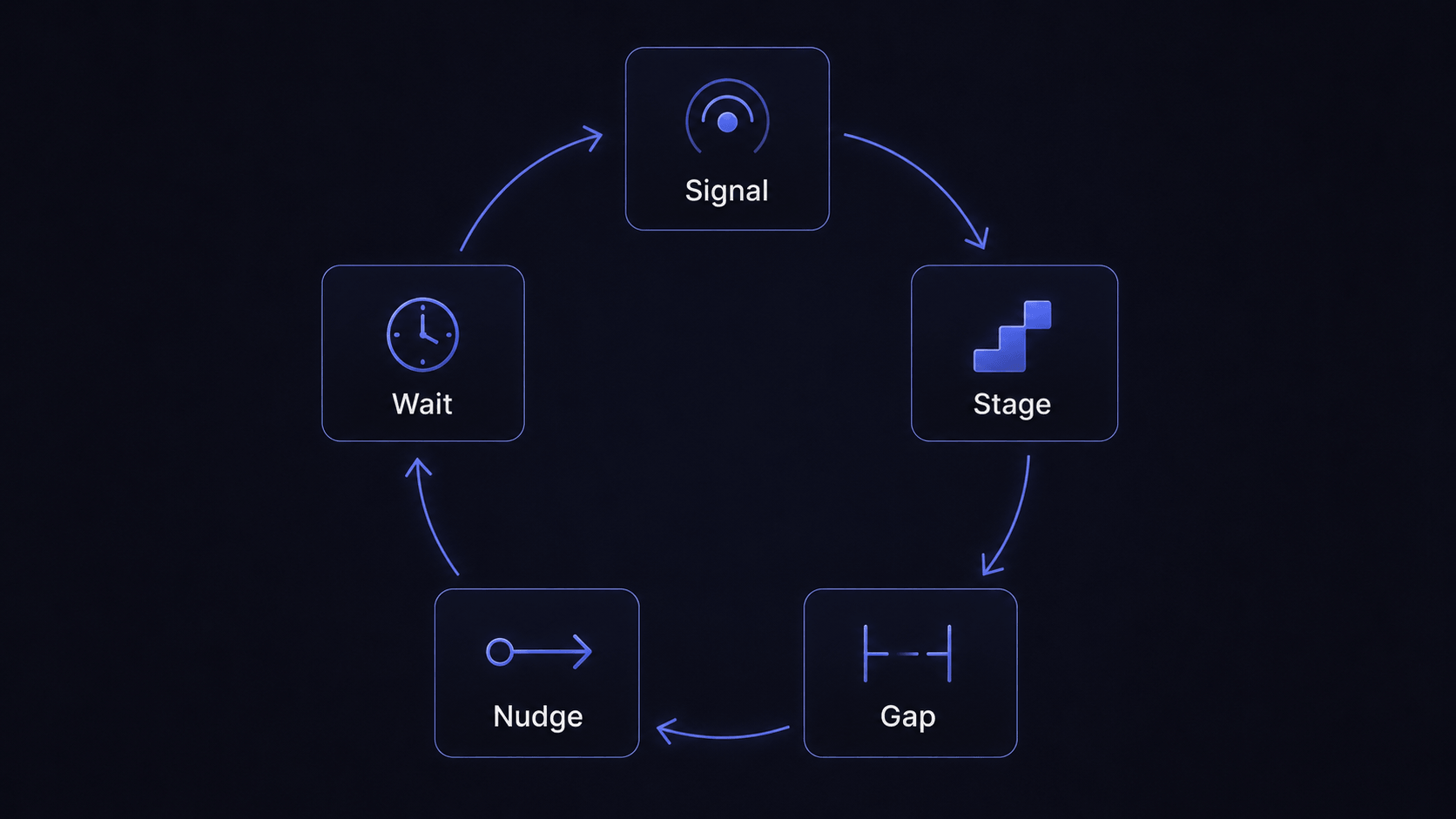
Every automation you design follows the same shape. Hold it in your head before you open any email tool:

  1. Start from a signal. An event the user fired, or a property that just became true.
  2. Name the stage. Where does that signal put them.
  3. Find the gap. What do they not yet know or do at this stage. That gap is the reason the email exists.
  4. Write one nudge. Close the gap and point at one next action.
  5. Wait for the next signal. Let their response decide what comes next.

Designed this way, an automation is a loop rather than a line. You are not laying down track and pushing everyone along it. You read where each person is and hand them the one thing that moves them forward, again and again, until they are activated.

Diagram of the onboarding automation loop showing five steps: signal, stage, gap, nudge, and wait for the next signal, drawn as a circle

The sequence I would actually send

People want a template, so here is the skeleton I start from. Treat it as a spine, not a script. Every email is tied to a stage, and the stage decides whether it sends at all.

  • Email 1: Welcome. Sent right after signup. Short, warm, pointed at the single most important first action. Grammarly nails this by asking for the extension install and nothing else. Pick the one step that gets your user to value fastest and make that the only ask.
  • Email 2: The activation step. The email that gets them to the moment your product becomes useful, whether that is importing data, creating the first item, or inviting a teammate. If the user already did it, this email never sends.
  • Email 3 onward: Feature education, paced to stage. Teach, but only what fits where they are. Asana times its feature education to the trial stage, surfacing project views and reporting when someone is ready for them instead of dumping everything on day one. Earn the right to advanced features by getting people through the basics first.
  • A re-engagement branch. If a user goes quiet, that is its own stage. This email skips the next lesson and helps them pick back up what they started. Tie it to inactivity, not a fixed date.
  • A stage-end email. With a trial, the strongest email is near the end, fired on trial state rather than a fixed day. Asana's halfway nudge tells the user they are halfway through, and its trial-end email reassures them they will not lose their work if they upgrade.

Most B2B SaaS companies run six to seven onboarding emails across roughly fourteen days, and faster freemium products compress that to around five in a week. Calendly does the short version because users activate quickly. The right length depends on how long your product takes to show value, not on a number you copied from a blog post.

There is one more email I would add, and it is my favorite from building Peerlist. Once someone gets through onboarding, we send a plain text email that simply asks how their onboarding went. Two or three lines, no design, no buttons. It asks for honest feedback and tells them we read every single reply. That one gets more replies than any other email we send during onboarding. It works because it is simple, it reads like a message from a person rather than from a product, and it does one thing and does it well. When an onboarding email is not landing, my first move is to strip it down until it has a single job, then make that job feel human.

Timing: get the first one out fast, then let behavior set the pace

Here is how I think about timing:

  • First email within about three hours of signup. The user just decided to try you, so attention is highest now. Wait until tomorrow and it is gone.
  • No more than two emails in the first forty eight hours. Usually a welcome plus one setup prompt. Push harder and you train people to mute you, which kills every email after.
  • After that, behavior sets the pace, not me. The next email waits for the next signal.

Send-time models that predict when each person is likely to open can lift open rates by around 26% and click rates by around 41% over fixed-schedule sends, per 2026 automation reporting. I will be honest, I do not treat any of these as gospel industry standards. The three hour rule is my own observation, so watch your own numbers and adjust.

One thing worth protecting while you do all this is deliverability. A welcome email that lands in spam is worth nothing, no matter how well timed. If you send onboarding email from your own domain, get your deliverability setup right before you worry about subject lines.

The mistakes that quietly kill onboarding

Four patterns sink most onboarding sequences, plus one habit that quietly caps how good they ever get:

  • Assuming product knowledge. You write as if the reader knows your jargon and your value. They do not. Write for someone who signed up on a whim and forgot half of why.
  • Letting the calendar drive. A timeline sequence ignores what the user is doing, so it sends the wrong email at the wrong moment, over and over.
  • Too many emails. Too much too fast and you become noise. Each email should have one job and earn the next one.
  • Treating it as fire and forget. Shipping the sequence is the start, not the finish. Put a recurring reminder on your calendar to check the numbers and adapt: open and click rates, replies, and the stage where people drop off. Kill the emails that underperform and double down on the ones that move users forward. If you are not sure which numbers matter, I broke it down in how to read email metrics.

If you fix only one of these, fix the calendar habit. Move your triggers onto events and properties and the rest shrinks on its own, because an event-driven sequence cannot send a stage-four email to a stage-one user.

FAQ

What is an onboarding email sequence? It is a series of automated emails that guide a new user from signup to the point where they get real value from your product. A good one is built around user stages and triggered by what the user does, rather than sent on a fixed daily schedule.

How many emails should a SaaS onboarding email sequence have? Most B2B SaaS products run about six to seven emails over roughly fourteen days. Faster freemium tools often compress to around five in a week. Match the length to how long your product takes to show value.

When should the first onboarding email be sent? Send the welcome email quickly, ideally within a few hours of signup, while the user's attention is still on you. After that, let behavior decide the timing of the rest.

What should the first onboarding email say? Point it at one action. Pick the single step that gets the user to value fastest and ask for that, with one clear button. Resist the urge to explain every feature in email one.

Is a behavior-triggered sequence better than a time-based one? For onboarding, yes. Behavior-triggered emails reach users in the moment they are acting, and they consistently outperform scheduled batch sends on open and click rates. They also avoid sending irrelevant emails to users who already moved ahead.

Do I need a different onboarding email sequence for free and paid users? Often, yes. A trial user and a paid user are at different stages with different goals. The cleanest setup moves a user into a new automation the moment they convert, so the messaging matches what they need next.

If you want to wire onboarding email like this onto real events from your app, that is the kind of thing AutoSend is built to handle: transactional and marketing email triggered by what your users actually do.

Related Articles